

This article contains affiliate links. If you make a purchase through these links, we may earn a small commission at no extra cost to you. This helps support our work in creating free travel guides.
WeChat (微信, Wēixìn) is the app China actually runs on. Chats, group bills, restaurant menus that only exist as mini-programs — a big share of daily life happens inside it. Its payment layer takes foreign cards. The officially published card list is broader than Alipay's, and American Express is on it — though the Add Card screen in the app always shows the latest lineup. Most travelers set up Alipay first for everyday paying. Get WeChat Pay working anyway. Sooner or later a menu, a ticket, or a taxi driver will point you at something that only exists inside WeChat. This guide covers which cards bind, how the setup goes — including the one famous trap — what it costs, and what order to try things in when a card refuses.
Which foreign cards work
The officially published list for WeChat Pay covers seven networks: Visa, Mastercard, American Express, Discover, JCB, Diners Club, and UnionPay International — check the Add a Bank Card screen for the latest version before you count on it. Alipay's official list is shorter — five networks: Visa, Mastercard, JCB, Diners Club, and Discover — and again, its in-app list carries the latest word. Two networks on WeChat's list are missing from Alipay's. The one travelers actually notice is American Express. If Amex is the main card you carry, start with WeChat, not Alipay.
The network logo is only half the story. Credit cards from major banks bind most reliably. Debit cards are a coin flip. Prepaid and virtual cards are not worth the attempt. Use your most boring card.
Setup: two minutes of tapping, one classic trap
You need less than you might think. A passport is the only document most visitors need, and no mainland Chinese phone number is required — mainland travel permits and residence permits for Hong Kong, Macao and Taiwan residents also work. The path: Me → Pay and Services → Wallet → Bank Cards → Add a Bank Card, then fill in the form; menu names drift a little between app versions, so if yours reads slightly differently, check under Me. Everything payment-related lives there. When the app first asks you to verify your identity, do it right away with your passport. Don't put it off. The full spending caps below only apply to verified accounts.
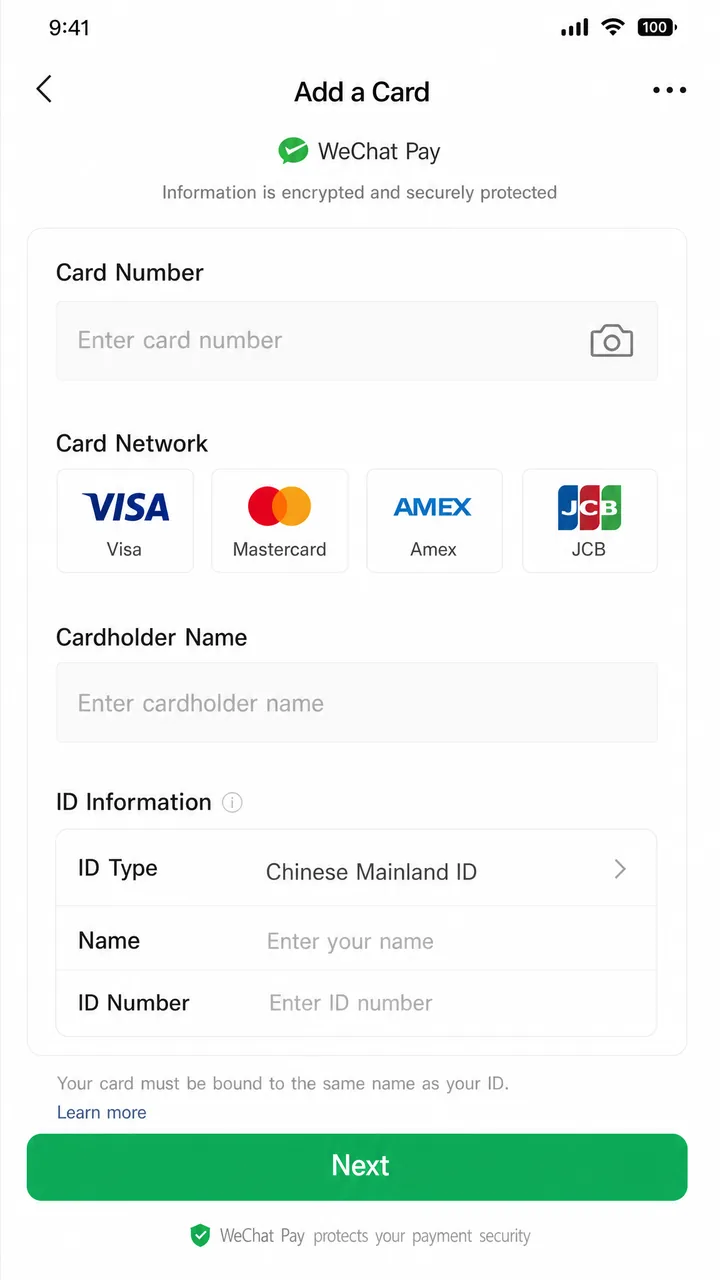
Now the classic trap: you open Me and there is no Wallet at all. Your account is not broken. WeChat serves different wallet features depending on the region your account sits in. Accounts registered abroad sometimes land in a region where the mainland wallet is hidden. The fix: dig through the app's payment settings for a wallet region option, and switch it to the Chinese mainland. If the switch is nowhere to be found, search "Wallet" inside the app, or reinstall and run setup again. One of those usually surfaces it.
Fees and limits
Start with the reassuring part: every payment shows its fee on the confirmation screen, before you approve it. That screen is the authority — what it shows is what you pay. The latest published structure: transactions under 200 RMB cost nothing, and above that the fee is 3% — that is, 3 RMB for every 100 RMB you spend. Refunds follow the same latest published rules: if a purchase is refunded, the fee comes back in proportion. First-time foreign-card users get one more break. Per the latest published promotion, your first 60 days come with fees waived on transactions up to 1,000 RMB, worth up to 30 RMB per transaction. For a trip of street food, metro rides and museum tickets, that often means paying no platform fees at all.
One more fee can come from your own bank. It may add a foreign-transaction fee of roughly 1-3% on top — check your card's terms before the trip. If yours charges it, the usual fix is a multi-currency travel card like Wise or Revolut, built for exactly this kind of spending.
The limits are high enough that most travelers never notice them. WeChat's published limits for foreign cards are 6,500 RMB per transaction, 50,000 RMB per month, and 65,000 RMB per year — and before a big-ticket purchase, your in-app wallet is the place to confirm the caps on your own account. For meals, transport and shopping, those numbers are plenty. Above them sits the central bank's ceiling for verified foreign visitors — $5,000 per transaction, $50,000 per year — one more reason to verify early.
When a card refuses to bind
The error messages here are famously unhelpful. Ignore the wording and work the sequence:
- Try another card — ideally a credit card on a different network from the list above. This clears more failures than everything else combined.
- Check the name fields. Card, passport, and account must match character for character.
- Finish identity verification first, then add the card again. Some "binding failures" are really unfinished verification.
- Call your bank. Ask it to allow international online transactions, and ask whether the card supports 3-D Secure. Many banks silently block unfamiliar Chinese merchants until you ask.
- Update the app and check the wallet region again. A surprising share of stubborn failures turn out to be region problems.
- Still stuck? Switch to the alternatives below and get on with your trip. This is not worth a whole evening.
To reach a human, WeChat Pay's customer service line is 95017 inside China, or +86 571 95017 from abroad.
Paying day to day: scan, or be scanned
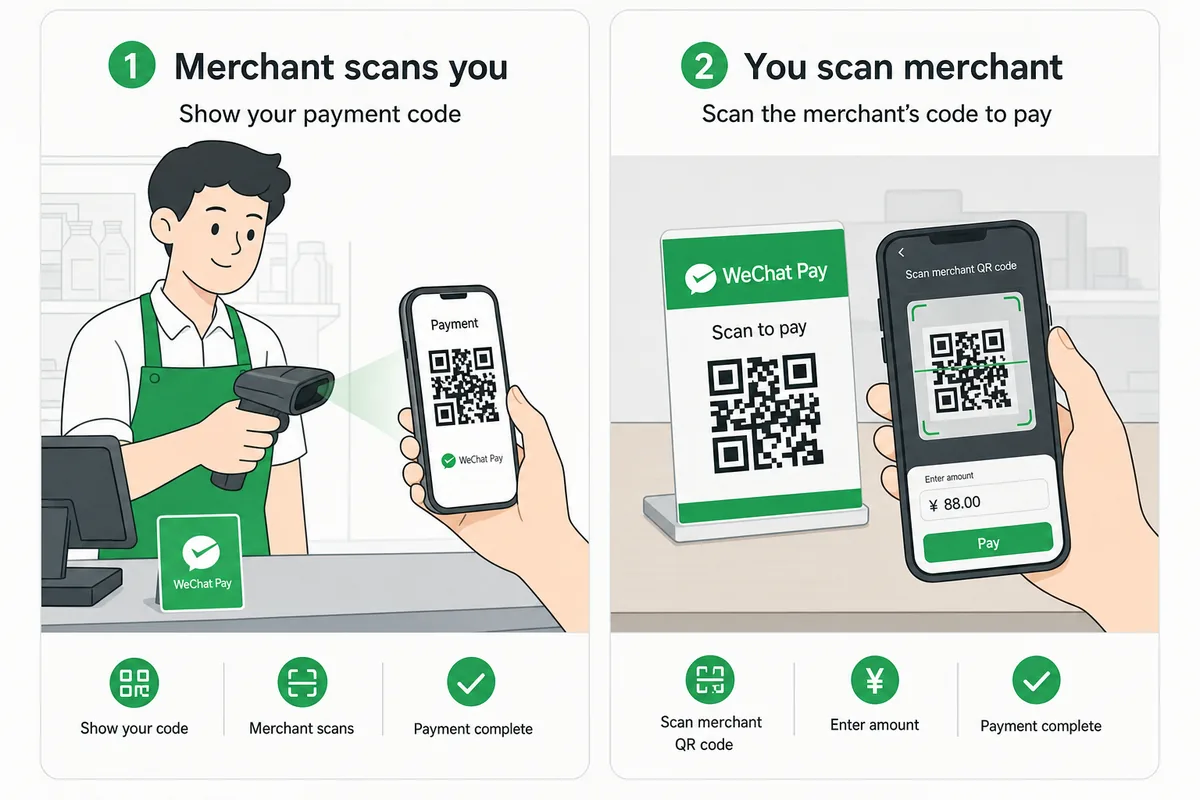
Chinese QR payments run in two directions. Knowing which is which saves your first awkward checkout. At small shops and street stalls, you scan them. Find the printed code taped to the counter. Point the in-app scanner at it. Type the amount the vendor tells you. Show them the confirmation screen. Done. At supermarkets, chain stores and ticket gates, they scan you. Open your payment code and hold it under the clerk's scanner. No amount to type — the register handles that. Not sure which mode a place uses? Hold your phone up with a questioning look. Staff deal with unsure visitors all day, and they will point you at the right move.
One more thing nobody warns you about. In many restaurants, the QR code on the table is not for paying. It is for ordering. Scan it and a mini-program menu opens right inside WeChat. You tap dishes, and payment happens in the same flow at the end. It feels strange the first time and completely natural the second. This is exactly why WeChat Pay is worth setting up even if Alipay handles most of your spending: those ordering menus open inside WeChat, not anywhere else.
What it will and won't do
With a foreign card bound, WeChat Pay covers everyday consumer payments — scanning merchant codes and showing your own payment code at checkouts, per the latest official guidance. What it will not do: red packets and person-to-person transfers stay locked for foreign cards under the latest published rules. Here is where that bites. A group dinner ends. Everyone settles up by sending money in the chat. You cannot chip in. Pay the restaurant directly instead, or square up in cash — nobody at the table will mind.
If WeChat won't cooperate
Ranked by convenience:
- Alipay takes the same passport and most of the same networks — the full setup is in our Alipay foreign-card guide. Between the two apps, most cards will bind in at least one.
- Your wallet from home may simply work. Through the Alipay+ network, users of 10+ e-wallets from Malaysia, South Korea, Singapore and elsewhere can scan mainland payment codes directly with the app they already have.
- Cash is guaranteed by law — RMB is legal tender and refusing it is a punishable offence.
- ATMs bridge the gap: Bank of China ATMs take UnionPay, Visa, Mastercard, JCB and Amex around the clock, currently capped at 3,000 RMB per withdrawal under the bank's published rules.
The short version
Set up WeChat Pay at home, before you fly. Use your own phone number and a mainstream credit card. Do identity verification on day one. If Wallet is hiding, switch the wallet region to the mainland. Keep one backup ready — Alipay, your wallet from home, or a little cash. Group-dinner transfers are the only thing you will genuinely miss. For how all the pieces fit together, read our guide to Chinese payment systems, and round out the toolkit with using international cards in China, where to exchange money and the digital yuan for tourists.
Official references: WeChat Pay's guide to setting up international cards and the People's Bank of China Payment Guide for Foreigners in China.
Last updated: August 2026
Fact-checked sources
- Official Beijing Municipal Government 3 pages
- Official People's Bank of China
- Official WeChat Pay Help Center
- Official WeChat Pay official guide (PDF)
- Official Chinese central government (gov.cn)
- Official Tencent
- Trip.com
- Official Alipay+
Show 2 more sources
- Official Shanghai Municipal Government
- Official Bank of China
Last verified: 2026-07-19
Read in other languages
Last train times for 10 Chinese metro systems
Every line and station, checked by hand — the same data behind our offline route planner.
Get the WaysChina App
Offline guides, currency converter, essential phrases, and more — all in your pocket.

Related Articles

Do You Need Cash in China? How Much to Bring and Where to Get It
Yes, bring some cash to China — just not much. A practical guide to how much to carry, where to withdraw yuan at a...

Digital Yuan for Tourists: How to Use e-CNY in China
China's digital yuan (e-CNY) is open to foreign visitors, no Chinese bank account needed. Here's how to set up a...

How to Use Alipay with Foreign Cards: Setup, Fees and Fixes
Bind your Visa or Mastercard to Alipay in about 10 minutes: which cards work, real fees and limits, what to do when...

Understanding Chinese Payment Systems: Mobile, Cards, Cash and e-CNY
How payments in China actually fit together — mobile apps, bank cards, cash and the digital yuan — with real-world...